              _        _             _ _
  ___ ___ ___| |_ __ _| |_ _   _ ___| (_)_ __   ___
 / __/ __/ __| __/ _` | __| | | / __| | | '_ \ / _ \
| (_| (__\__ \ || (_| | |_| |_| \__ \ | | | | |  __/
 \___\___|___/\__\__,_|\__|\__,_|___/_|_|_| |_|\___|
# ccstatusline
**🎨 A highly customizable status line formatter for Claude Code CLI**
*Display model info, git branch, token usage, and other metrics in your terminal*
[](https://www.npmjs.com/package/ccstatusline)
[](https://www.npmjs.com/package/ccstatusline)
[](https://github.com/sirmalloc/ccstatusline/blob/main/LICENSE)
[](https://nodejs.org)
[](https://packagephobia.com/result?p=ccstatusline)
[](https://github.com/sirmalloc/ccstatusline/graphs/commit-activity)
[](https://github.com/hesreallyhim/awesome-claude-code)
## 📚 Table of Contents
- [Recent Updates](#-recent-updates)
- [Features](#-features)
- [Quick Start](#-quick-start)
- [Usage](#-usage)
- [Development](#️-development)
- [Contributing](#-contributing)
- [License](#-license)
- [Related Projects](#-related-projects)
---
## 🆕 Recent Updates
### v2.0.8 - Powerline Auto-Alignment
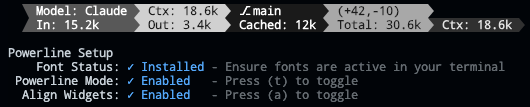
- **🎯 Widget Alignment** - Auto-align widgets across multiple status lines in Powerline mode for a clean, columnar layout (toggle with 'a' in Powerline Setup)
### v2.0.7 - Current Working Directory & Session Cost

- **📁 Current Working Directory** - Display the current working directory with configurable segment display
- Set the number of path segments to show (e.g., show only last 2 segments: `.../Personal/ccstatusline`)
- Supports raw value mode for compact display
- Automatically truncates long paths with ellipsis
- **💰 Session Cost Widget** - Track your Claude Code session costs (requires Claude Code 1.0.85+)
- Displays total session cost in USD
- Supports raw value mode (shows just `$X.YZ` vs `Cost: $X.YZ`)
- Real-time cost tracking from Claude Code session data
- Note: Cost may not update properly when using `/resume` (Claude Code limitation)
- **🐛 Bug Fixes**
- Fixed Block Timer calculations for accurate time tracking across block boundaries
- Improved widget editor stability with proper Ctrl+S handling
- Enhanced cursor display in numeric input fields
### v2.0.2 - Block Timer Widget

- **⏱️ Block Timer** - Track your progress through 5-hour Claude Code blocks
- Displays time elapsed in current block as hours/minutes (e.g., "3hr 45m")
- Progress bar mode shows visual completion percentage
- Two progress bar styles: full width (32 chars) or compact (16 chars)
- Automatically detects block boundaries from transcript timestamps
### v2.0.0 - Powerline Support & Enhanced Themes
- **⚡ Powerline Mode** - Beautiful Powerline-style status lines with arrow separators and customizable caps
- **🎨 Built-in Themes** - Multiple pre-configured themes that you can copy and customize
- **🌈 Advanced Color Support** - Basic (16), 256-color (with custom ANSI codes), and truecolor (with hex codes) modes
- **🔗 Widget Merging** - Merge multiple widgets together with or without padding for seamless designs
- **📦 Easy Installation** - Install directly with `npx` or `bunx` - no global package needed
- **🔤 Custom Separators** - Add multiple Powerline separators with custom hex codes for font support
- **🚀 Auto Font Install** - Automatic Powerline font installation with user consent
---
## ✨ Features
- **📊 Real-time Metrics** - Display model name, git branch, token usage, session duration, block timer, and more
- **🎨 Fully Customizable** - Choose what to display and customize colors for each element
- **⚡ Powerline Support** - Beautiful Powerline-style rendering with arrow separators, caps, and custom fonts
- **📐 Multi-line Support** - Configure up to 3 independent status lines
- **🖥️ Interactive TUI** - Built-in configuration interface using React/Ink
- **⚙️ Global Options** - Apply consistent formatting across all widgets (padding, separators, bold, background)
- **🚀 Cross-platform** - Works seamlessly with both Bun and Node.js
- **📏 Smart Width Detection** - Automatically adapts to terminal width with flex separators
- **⚡ Zero Config** - Sensible defaults that work out of the box
---
## 🚀 Quick Start
### No installation needed! Use directly with npx or bunx:
```bash
# Run the configuration TUI with npm
npx ccstatusline@latest
# Or with Bun (faster)
bunx ccstatusline@latest
```
### Configure ccstatusline
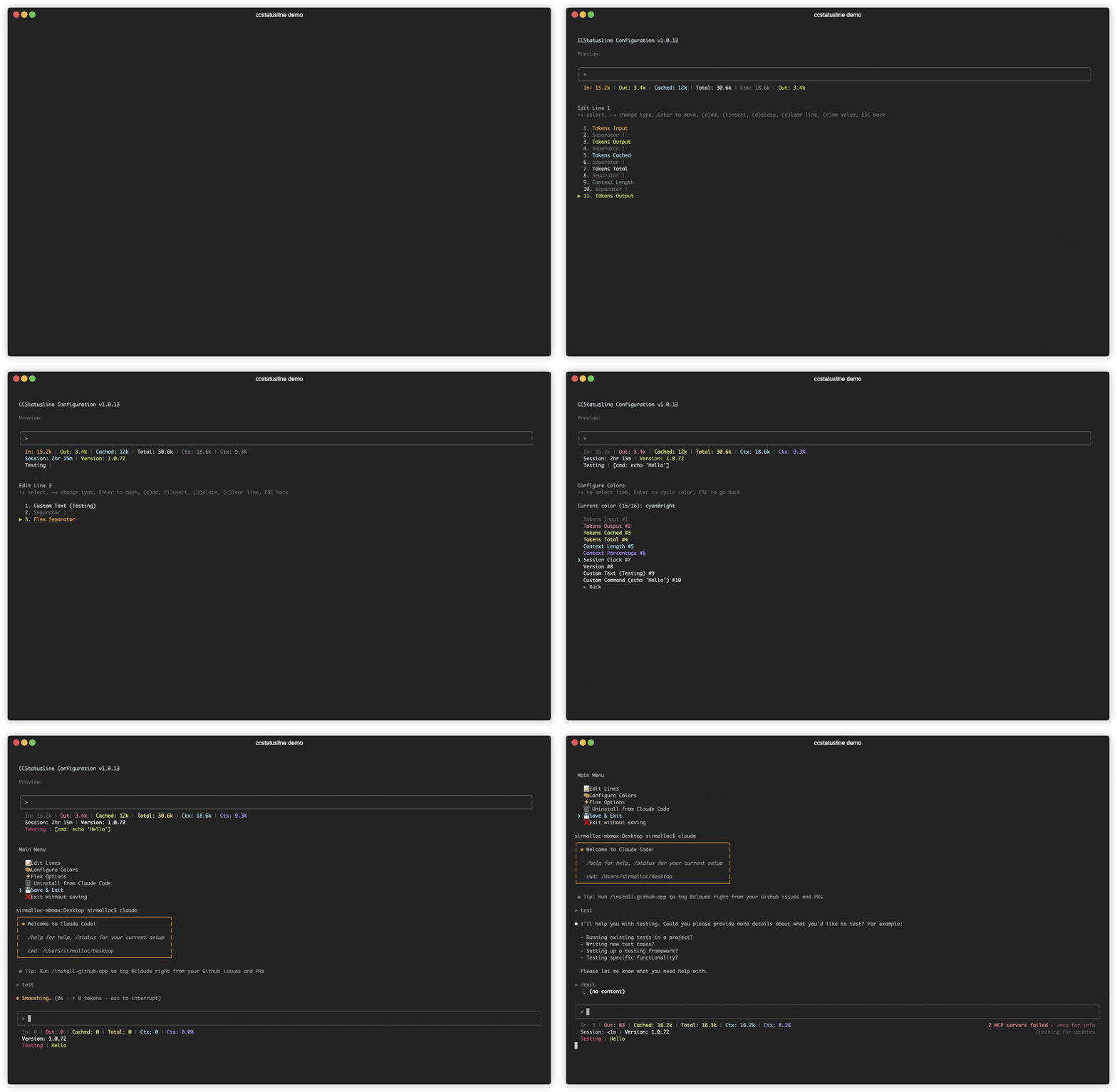
The interactive configuration tool provides a terminal UI where you can:
- Configure up to 3 separate status lines
- Add/remove/reorder status line widgets
- Customize colors for each widget
- Configure flex separator behavior
- Edit custom text widgets
- Install/uninstall to Claude Code settings
- Preview your status line in real-time
> 💡 **Tip:** Your settings are automatically saved to `~/.config/ccstatusline/settings.json`
---
## 📖 Usage
Once configured, ccstatusline automatically formats your Claude Code status line. The status line appears at the bottom of your terminal during Claude Code sessions.
### 📊 Available Widgets
- **Model Name** - Shows the current Claude model (e.g., "Claude 3.5 Sonnet")
- **Git Branch** - Displays current git branch name
- **Git Changes** - Shows uncommitted insertions/deletions (e.g., "+42,-10")
- **Session Clock** - Shows elapsed time since session start (e.g., "2hr 15m")
- **Session Cost** - Shows total session cost in USD (e.g., "$1.23")
- **Block Timer** - Shows time elapsed in current 5-hour block or progress bar
- **Current Working Directory** - Shows current working directory with configurable path segments
- **Version** - Shows Claude Code version
- **Output Style** - Shows the currently set output style in Claude Code
- **Tokens Input** - Shows input tokens used
- **Tokens Output** - Shows output tokens used
- **Tokens Cached** - Shows cached tokens used
- **Tokens Total** - Shows total tokens used
- **Context Length** - Shows current context length in tokens
- **Context Percentage** - Shows percentage of context limit used (out of 200k)
- **Context Percentage (usable)** - Shows percentage of usable context (out of 160k, accounting for auto-compact at 80%)
- **Terminal Width** - Shows detected terminal width (for debugging)
- **Custom Text** - Add your own custom text to the status line
- **Custom Command** - Execute shell commands and display their output (refreshes whenever the statusline is updated by Claude Code)
- **Separator** - Visual divider between widgets (customizable: |, -, comma, space)
- **Flex Separator** - Expands to fill available space
---
### Terminal Width Options
These settings affect where long lines are truncated, and where right-alignment occurs when using flex separators:
- **Full width always** - Uses full terminal width (may wrap if auto-compact message appears or IDE integration adds text)
- **Full width minus 40** - Reserves 40 characters for auto-compact message to prevent wrapping (default)
- **Full width until compact** - Dynamically switches between full width and minus 40 based on context percentage threshold (configurable, default 60%)
---
### ⚙️ Global Options
Configure global formatting preferences that apply to all widgets:
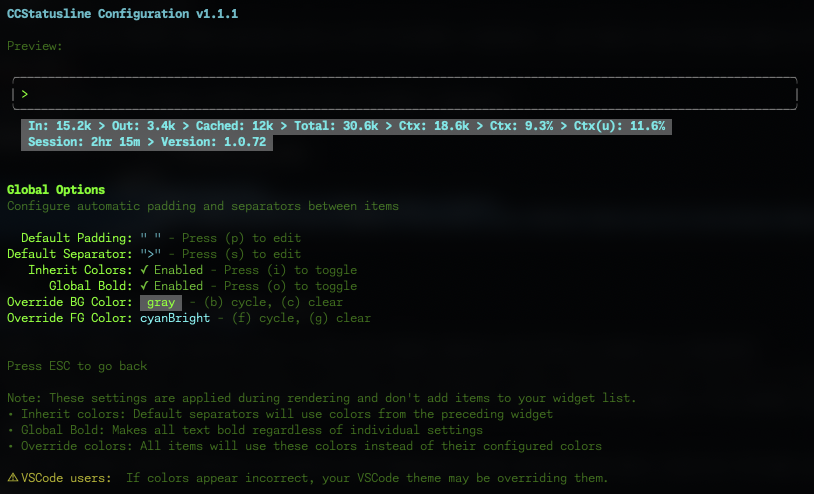
#### Default Padding & Separators
- **Default Padding** - Add consistent padding to the left and right of each widget
- **Default Separator** - Automatically insert a separator between all widgets
- Press **(p)** to edit padding
- Press **(s)** to edit separator
### 🌟 Show Your Support
Give a ⭐ if this project helped you!
[](https://github.com/sirmalloc/ccstatusline/stargazers)
[](https://github.com/sirmalloc/ccstatusline/network/members)
[](https://github.com/sirmalloc/ccstatusline/watchers)
[](https://www.npmjs.com/package/ccstatusline)
[](https://www.npmjs.com/package/ccstatusline)
[](https://github.com/sirmalloc/ccstatusline/blob/main/LICENSE)
[](https://bun.sh)
[](https://github.com/sirmalloc/ccstatusline/issues)
[](https://github.com/sirmalloc/ccstatusline/pulls)
[](https://github.com/sirmalloc/ccstatusline/graphs/contributors)
### 💬 Connect
[Report Bug](https://github.com/sirmalloc/ccstatusline/issues) · [Request Feature](https://github.com/sirmalloc/ccstatusline/issues) · [Discussions](https://github.com/sirmalloc/ccstatusline/discussions)