
ccstatusline
🎨 A highly customizable status line formatter for Claude Code CLI that displays model info, git branch, token usage, and other metrics in your terminal.
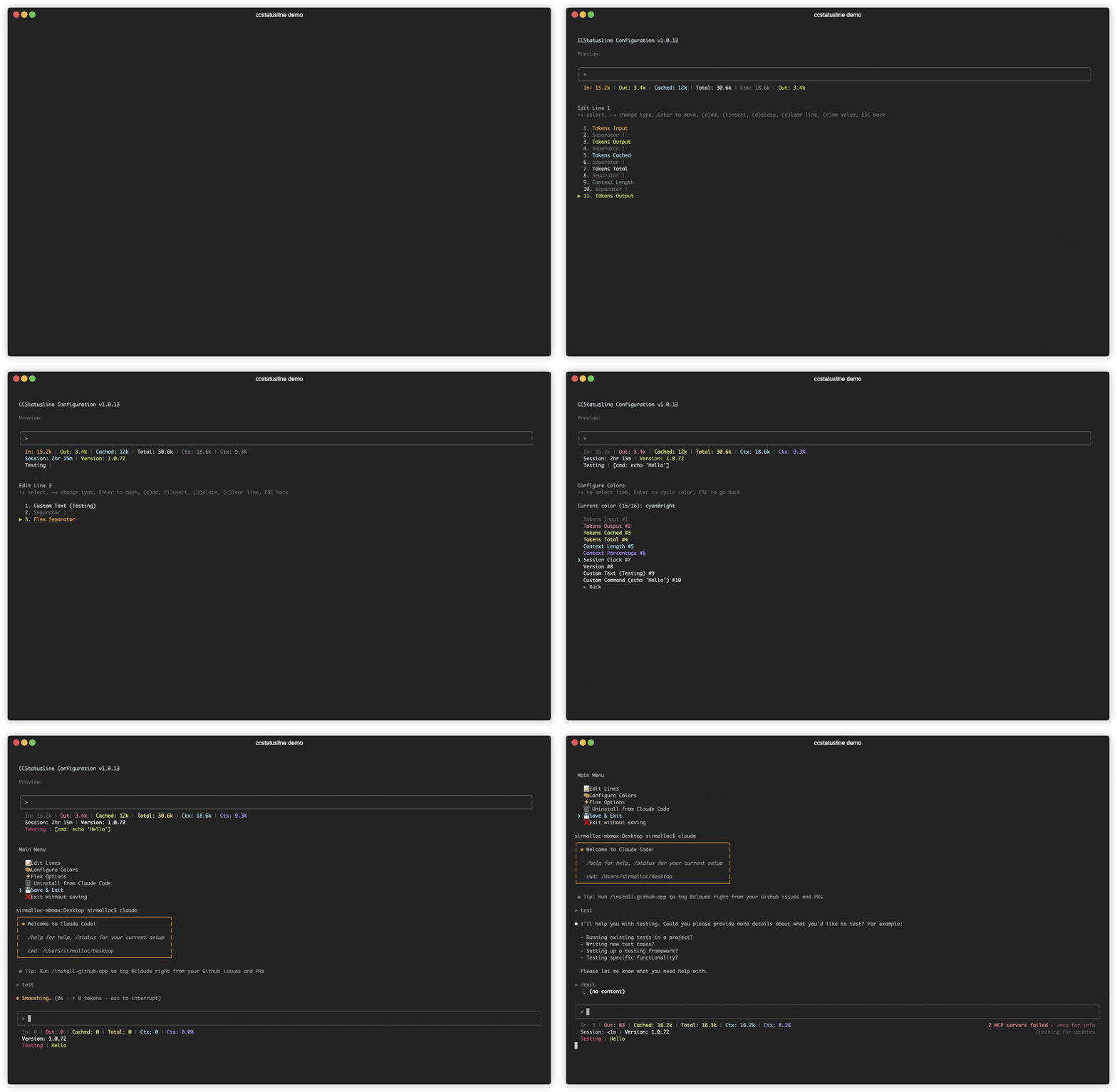
🆕 Recent Updates
v1.1.0 - Enhanced Customization
- 🎨 Background Colors - Set background colors for individual status items in Color Configuration menu
- 🔤 Bold Text Styling - Toggle bold formatting for individual items in Color Configuration menu
- ⚙️ Global Options Menu - New menu for global formatting preferences including padding, separators, color inheritance, and overrides
✨ Features
- 📊 Real-time Metrics - Display model name, git branch, token usage, session duration, and more
- 🎨 Fully Customizable - Choose what to display and customize colors for each element
- 📐 Multi-line Support - Configure up to 3 independent status lines
- 🖥️ Interactive TUI - Built-in configuration interface using React/Ink
- ⚙️ Global Options - Apply consistent formatting across all items (padding, separators, bold, background)
- 🚀 Cross-platform - Works seamlessly with both Bun and Node.js
- 📏 Smart Width Detection - Automatically adapts to terminal width with flex separators
- ⚡ Zero Config - Sensible defaults that work out of the box
🚀 Quick Start
No installation needed! Use directly with npx:
# Run the configuration TUI
npx ccstatusline@latest
Configure ccstatusline
The interactive configuration tool provides a terminal UI where you can:
- Configure up to 3 separate status lines
- Add/remove/reorder status line items
- Customize colors for each element
- Configure flex separator behavior
- Edit custom text items
- Install/uninstall to Claude Code settings
- Preview your status line in real-time
💡 Tip: Your settings are automatically saved to
~/.config/ccstatusline/settings.json
📖 Usage
Once configured, ccstatusline automatically formats your Claude Code status line. The status line appears at the bottom of your terminal during Claude Code sessions.
📊 Available Status Items
- Model Name - Shows the current Claude model (e.g., "Claude 3.5 Sonnet")
- Git Branch - Displays current git branch name
- Git Changes - Shows uncommitted insertions/deletions (e.g., "+42,-10")
- Session Clock - Shows elapsed time since session start (e.g., "2hr 15m")
- Version - Shows Claude Code version
- Tokens Input - Shows input tokens used
- Tokens Output - Shows output tokens used
- Tokens Cached - Shows cached tokens used
- Tokens Total - Shows total tokens used
- Context Length - Shows current context length in tokens
- Context Percentage - Shows percentage of context limit used (out of 200k)
- Context Percentage (usable) - Shows percentage of usable context (out of 160k, accounting for auto-compact at 80%)
- Terminal Width - Shows detected terminal width (for debugging)
- Custom Text - Add your own custom text to the status line
- Custom Command - Execute shell commands and display their output (refreshes whenever the statusline is updated by Claude Code)
- Separator - Visual divider between items (customizable: |, -, comma, space)
- Flex Separator - Expands to fill available space
⌨️ TUI Controls
Main Menu
- ↑↓ - Navigate menu items
- Enter - Select item
- Ctrl+C - Exit
Line Editor
- ↑↓ - Select item
- ←→ - Change item type
- Enter - Enter move mode (reorder items)
- a - Add item at end
- i - Insert item before selected
- d - Delete selected item
- c - Clear entire line
- r - Toggle raw value mode (no labels)
- b - Toggle bold text for this item
- e - Edit value (for custom-text and custom-command items)
- w - Set max width (for custom-command items)
- t - Set timeout in milliseconds (for custom-command items)
- p - Toggle preserve colors (for custom-command items)
- Space - Change separator character (for separator items)
- ESC - Go back
Color Configuration
- ↑↓ - Select item
- Enter - Cycle through colors
- ESC - Go back
Flex Options
Configure how flex separators calculate available width:
- Full width always - Uses full terminal width (may wrap with auto-compact message)
- Full width minus 40 - Leaves space for auto-compact message (default)
- Full width until compact - Switches based on context percentage threshold
⚙️ Global Options
Configure global formatting preferences that apply to all status items:
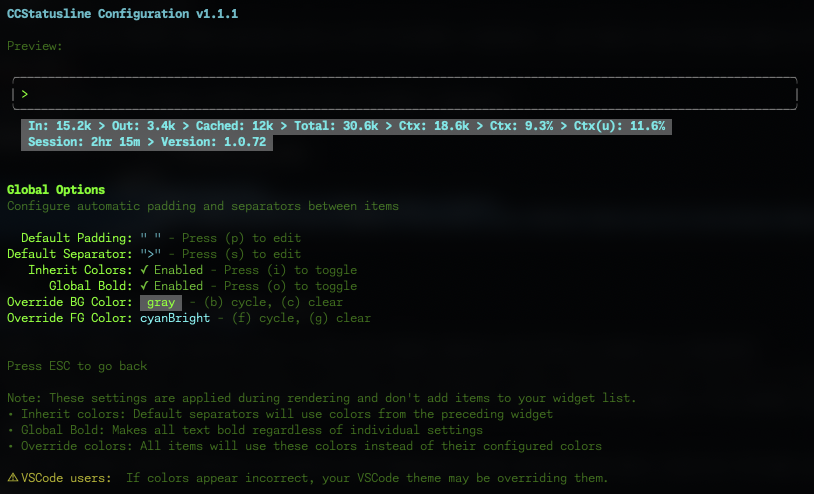
Default Padding & Separators
- Default Padding - Add consistent padding to the left and right of each item
- Default Separator - Automatically insert a separator between all items
- Press (p) to edit padding
- Press (s) to edit separator
Global Formatting
- Inherit Colors - Default separators inherit foreground and background colors from the preceding widget
- Press (i) to toggle
- Global Bold - Apply bold formatting to all text regardless of individual item settings
- Press (o) to toggle
- Override Foreground Color - Force all items to use the same text color
- Press (f) to cycle through colors
- Press (v) to clear override
- Override Background Color - Force all items to use the same background color
- Press (b) to cycle through colors
- Press (c) to clear override
💡 Note: These settings are applied during rendering and don't add items to your widget list. They provide a consistent look across your entire status line without modifying individual item configurations.
⚠️ VSCode Users: If colors appear incorrect in the VSCode integrated terminal, your VSCode theme may be overriding the ANSI color codes. This is a known limitation of VSCode's terminal rendering. The status line will display correctly in standalone terminals.
🔤 Raw Value Mode
Some items support "raw value" mode which displays just the value without a label:
- Normal:
Model: Claude 3.5 Sonnet→ Raw:Claude 3.5 Sonnet - Normal:
Session: 2hr 15m→ Raw:2hr 15m - Normal:
Ctx: 18.6k→ Raw:18.6k
🔧 Custom Widgets
Custom Text Widget
Add static text to your status line. Perfect for:
- Project identifiers
- Environment indicators (dev/prod)
- Personal labels or reminders
Custom Command Widget
Execute shell commands and display their output dynamically:
- Refreshes whenever the statusline is updated by Claude Code
- Receives the full Claude Code JSON data via stdin (model info, session ID, transcript path, etc.)
- Displays command output inline in your status line
- Configurable timeout (default: 1000ms)
- Examples:
pwd | xargs basename- Show current directory namenode -v- Display Node.js versiongit rev-parse --short HEAD- Show current commit hashdate +%H:%M- Display current timecurl -s wttr.in?format="%t"- Show current temperaturenpx -y ccusage statusline- Display Claude usage metrics (set timeout: 5000ms)
⚠️ Note: Commands should complete quickly to avoid delays. Long-running commands will be killed after the configured timeout. If you're not seeing output from your custom command, try increasing the timeout value (press 't' in the editor).
💡 Tip: Custom commands can be other Claude Code compatible status line formatters! They receive the same JSON via stdin that ccstatusline receives from Claude Code, allowing you to chain or combine multiple status line tools.
🔗 Integration Example: ccusage
ccusage is a tool that tracks and displays Claude Code usage metrics. You can integrate it directly into your status line:
- Add a Custom Command widget
- Set command:
npx -y ccusage statusline - Set timeout:
5000(5 seconds for initial download) - Enable "preserve colors" to keep ccusage's color formatting

The command receives Claude Code's JSON data via stdin, allowing ccusage to access session information, model details, and transcript data for accurate usage tracking.
✂️ Smart Truncation
When terminal width is detected, status lines automatically truncate with ellipsis (...) if they exceed the available width, preventing line wrapping.
🛠️ Development
Prerequisites
- Bun (v1.0+)
- Git
- Node.js 18+ (optional, for npm publishing)
Setup
# Clone the repository
git clone https://github.com/yourusername/ccstatusline.git
cd ccstatusline

# Install dependencies
bun install
Development Commands
# Run in TUI mode (configuration)
bun run src/ccstatusline.ts

# Build for distribution
bun run build
📁 Project Structure
ccstatusline/
├── src/
│   ├── ccstatusline.ts     # Main entry point
│   ├── tui.tsx             # React/Ink configuration UI
│   ├── config.ts           # Settings management
│   └── claude-settings.ts  # Claude Code settings integration
├── dist/                   # Built files (generated)
├── package.json
├── tsconfig.json
└── README.md
🤝 Contributing
Contributions are welcome! Please feel free to submit a Pull Request.
- Fork the repository
- Create your feature branch (
git checkout -b feature/amazing-feature) - Commit your changes (
git commit -m 'Add some amazing feature') - Push to the branch (
git push origin feature/amazing-feature) - Open a Pull Request
📄 License
MIT © Matthew Breedlove
👤 Author
Matthew Breedlove
- GitHub: @sirmalloc
🔗 Related Projects
- tweakcc - Customize Claude Code themes, thinking verbs, and more.
🙏 Acknowledgments
- Built for use with Claude Code CLI by Anthropic
- Powered by Ink for the terminal UI
- Made with ❤️ for the Claude Code community

