 Alex
00be2c05ad
Alex
00be2c05ad
Query embedding moved to the Celery worker, but nothing that ships was
updated to consume the queue it dispatches to.

- Add `embeddings` to every worker `-Q` list (compose x3, k8s, devcontainer,
  sandbox README). Without it a search blocked for EMBEDDINGS_DELEGATE_TIMEOUT
  and then answered with no retrieved context, because classic_rag swallows the
  dispatch error and skips the source -- bad answers, not an error.

- Skip the task_postrun heap reclaim for the embed task. The full gc.collect()
  was written for docling/torch parses; on a worker holding the ONNX model it
  measured ~86ms against ~8ms for the embed itself, a 9x slowdown of the round
  trip for a task that allocates a few kilobytes.

- Resolve the installation pin in the re-embed script. It never imports
  application.app, so an install pinned in app_metadata with no EMBEDDINGS_NAME
  set -- every stock k8s deployment, whose manifests carry no embedding config
  -- would rewrite its whole index with the legacy default and stamp
  sources.model to match, then be told by the boot warning to run it again.

- Fail fast for 30s after a failed dispatch. fanout.embed_questions falls back
  to letting each store embed its own query, so one dead-worker retrieval paid
  the timeout once in the fan-out and again per source.

- Forget the task result. Nothing reads it back: the key is per-dispatch UUID,
  not content-addressed, so a repeated query mints another. Left alone every
  search leaked ~17KB for result_expires (7 days) into the Redis the broker
  shares -- on the bundled k8s manifest (1Gi, no maxmemory policy) that is an
  OOMKill that takes the broker with it.

- Release the model ensure_vector_schema loads to read the width of an
  unregistered model, in a process that delegates and would never call it.
  The width still comes from the model, not the table, so the mismatch check
  the hook exists for keeps working.

- Correct the docs that said otherwise: embeddings.md claimed the standard
  deployment worked unchanged, upgrading.mdx said no action was needed, and
  the settings table listed none of the three delegation settings.
DocsGPT 🦖
Private AI for agents, assistants and enterprise search
DocsGPT is an open-source AI platform for building intelligent agents and assistants. Features Agent Builder, deep research tools, document analysis (PDF, Office, web content, and audio), Multi-model support (choose your provider or run locally), and rich API connectivity for agents with actionable tools and integrations. Deploy anywhere with complete privacy control.



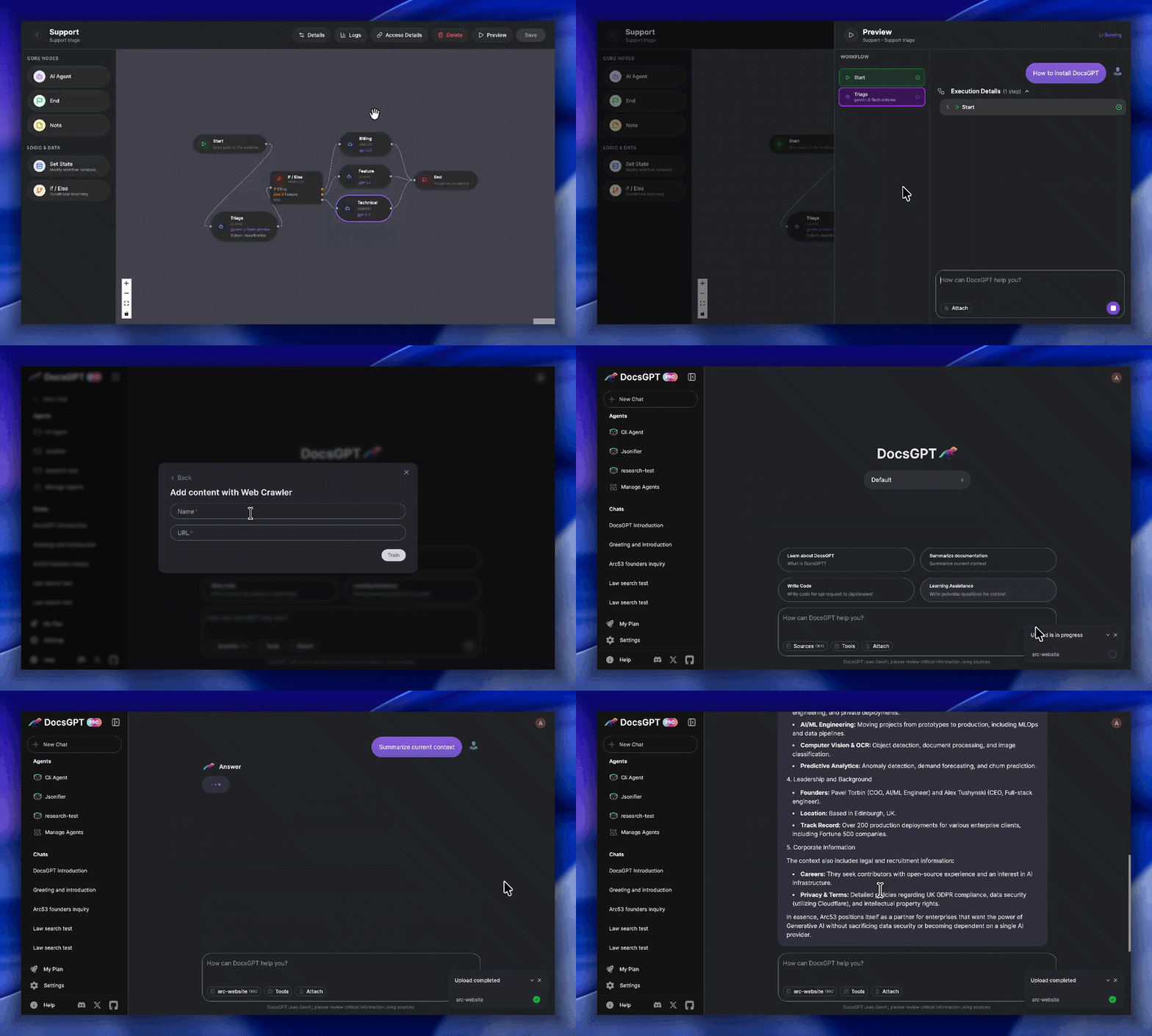
Key Features:
- 🗂️ Wide Format Support: Reads PDF, DOCX, CSV, XLSX, EPUB, MD, RST, HTML, MDX, JSON, PPTX, images, and audio files such as MP3, WAV, M4A, OGG, and WebM.
- 🎙️ Speech Workflows: Record voice input into chat, transcribe audio on the backend, and ingest meeting recordings or voice notes as searchable knowledge.
- 🌐 Web & Data Integration: Ingests from URLs, sitemaps, Reddit, GitHub and web crawlers.
- ✅ Reliable Answers: Get accurate, hallucination-free responses with source citations viewable in a clean UI.
- 🔑 Streamlined API Keys: Generate keys linked to your settings, documents, and models, simplifying chatbot and integration setup.
- 🔗 Actionable Tooling: Connect to APIs, tools, and other services to enable LLM actions.
- 🧩 Pre-built Integrations: Use readily available HTML/React chat widgets, search tools, Discord/Telegram bots, and more.
- 🔌 Flexible Deployment: Works with major LLMs (OpenAI, Google, Anthropic) and local models (Ollama, llama_cpp).
- 🏢 Secure & Scalable: Run privately and securely with Kubernetes support, designed for enterprise-grade reliability.
Roadmap
- Agent Workflow Builder with conditional nodes ( February 2026 )
- Research mode ( March 2026 )
- SharePoint & Confluence connectors ( March – April 2026 )
- Postgres migration for user data ( April 2026 )
- OpenTelemetry observability ( April 2026 )
- Bring Your Own Model (BYOM) ( April 2026 )
- Agent scheduling (RedBeat-backed) ( April 2026 )
- Notifications & conversation search ( May 2026 )
- Analytics & logs revamp with per-agent attribution ( June 2026 )
- OIDC / SSO login with SCIM provisioning & groups ( June 2026 )
- Admin dashboard & role-based access control (RBAC) ( June 2026 )
- Agent import / export ( June 2026 )
- Teams with team-scoped sharing & roles ( June 2026 )
You can find our full roadmap here. Please don't hesitate to contribute or create issues, it helps us improve DocsGPT!
Production Support / Help for Companies:
We're eager to provide personalized assistance when deploying your DocsGPT to a live environment.
Join the Lighthouse Program 🌟
Calling all developers and GenAI innovators! The DocsGPT Lighthouse Program connects technical leaders actively deploying or extending DocsGPT in real-world scenarios. Collaborate directly with our team to shape the roadmap, access priority support, and build enterprise-ready solutions with exclusive community insights.
QuickStart
Note
Make sure you have Docker installed
A more detailed Quickstart is available in our documentation
-
Clone the repository:
git clone https://github.com/arc53/DocsGPT.git
cd DocsGPT
For macOS and Linux:
-
Run the setup script:
./setup.sh
For Windows:
-
Run the PowerShell setup script:
PowerShell -ExecutionPolicy Bypass -File .\setup.ps1
Either script will guide you through setting up DocsGPT. Five options are available: using the public API, running locally, connecting to a local inference engine, using a cloud API provider, or building the docker image locally. The scripts will automatically configure your .env file and handle necessary downloads and installations based on your chosen option.
Navigate to http://localhost:5173/
To stop DocsGPT, open a terminal in the DocsGPT directory and run:
docker compose -f deployment/docker-compose.yaml down
(or use the specific docker compose down command shown after running the setup script).
Note
For development environment setup instructions, please refer to the Development Environment Guide.
Contributing
Please refer to the CONTRIBUTING.md file for information about how to get involved. We welcome issues, questions, and pull requests.
Architecture
Project Structure
-
Application - Backend Flask application.
-
Extensions - Integrations and widgets (e.g., Chatwoot, React widget).
-
Scripts - Miscellaneous utility scripts.
Code Of Conduct
We as members, contributors, and leaders, pledge to make participation in our community a harassment-free experience for everyone, regardless of age, body size, visible or invisible disability, ethnicity, sex characteristics, gender identity and expression, level of experience, education, socio-economic status, nationality, personal appearance, race, religion, or sexual identity and orientation. Please refer to the CODE_OF_CONDUCT.md file for more information about contributing.
Many Thanks To Our Contributors⚡
License
The source code license is MIT, as described in the LICENSE file.
This project is supported by:
